

You run a speed test. It says 600 Mbps. You click download on a game update, and it crawls at 2 MB/s. You open a 4K YouTube video, and it stutters and buffers. You open Reddit and find dozens of threads where half the commentators yell "your ISP is throttling you" and the other half declare "no, they aren't."
Having analyzed carrier-grade traffic shaping appliances in our test lab, I can tell you that the answer is more nuanced than either camp admits. Sometimes it is deliberate traffic shaping. Frequently it is just neighborhood node congestion. Here is how to establish the difference with empirical network data.
2. Throttling vs. Congestion: Defining the Difference
To diagnose the issue accurately, you must understand the two fundamentally different mechanisms that cause sluggish speeds:
- Targeted ISP Throttling (Policy-Based): Your ISP's core routers utilize Deep Packet Inspection (DPI) to identify specific application signatures (e.g. BitTorrent traffic, Netflix streams, Steam downloads, or UDP gaming packets) and deliberately restrict those packets into a low-priority queue. Your overall connection is fast, but that specific application is capped.
- Network Congestion (Capacity-Based): Your neighborhood optical node or regional transit interconnect is physically overwhelmed with traffic during prime-time evening hours (7:00 PM to 11:00 PM). All protocols slow down simultaneously because packets are dropping across the entire pipe.
- Local Wi-Fi Contention: RF degradation, wall absorption, or interference from neighboring routers in your apartment building.
3. The VPN A/B Benchmark: The Only Definitive Home Test
The single most reliable method to prove ISP throttling is an encrypted VPN differential benchmark. When you route through an encrypted tunnel (like WireGuard or OpenVPN), your ISP can only see indistinguishable, encrypted random-looking ciphertext travelling to a single IP address. They cannot inspect SNI domain headers or protocol handshakes.
Follow this precise protocol:
- Connect your computer directly via Cat6 Ethernet to your router.
- Execute our unthrottled VelocityVerify Speed Test without a VPN and test your download speed inside the struggling application (e.g. Steam or a 4K video stream). Note the transfer rate.
- Connect to a premium, low-overhead VPN server geographically close to your city.
- Rerun the speed test and re-test the struggling application.
How to Interpret Your Test Results
VPN encryption incurs a small 5%–10% cryptographic overhead. Therefore, if your speed stays the same or drops slightly through the VPN, your ISP is not throttling your traffic. However, if your download speed on Steam or Netflix jumps from 2 MB/s to 45 MB/s the second the VPN is activated, your ISP is caught red-handed throttling that application.
4. Inside the Hardware: How ISPs Shape Your Packets
Broadband carriers deploy Deep Packet Inspection (DPI) boxes (such as Sandvine or Cisco SCE engines) at edge aggregation nodes. These appliances classify packets based on TCP/UDP port ranges, TLS Server Name Indication (SNI) metadata, and packet size heuristics.
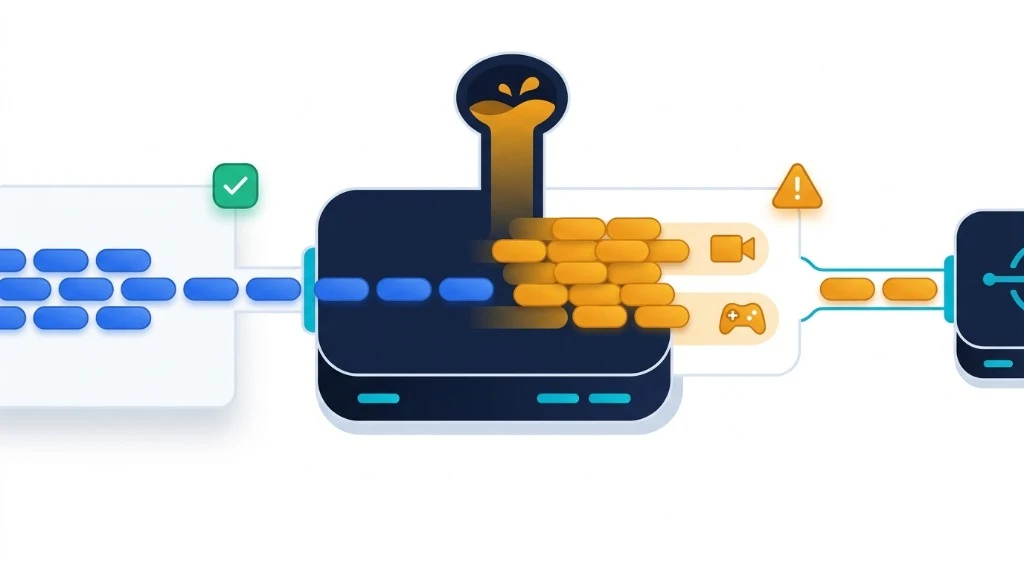
Traffic shaping architecture: DPI inspection engines segregating traffic into priority vs throttled queue buffers.
Packets classified as bulk downloads or video streams are forced into strict token-bucket rate limiters, while speed-test traffic is placed into unconstrained priority queues to keep consumer complaints low.
5. Testing by Time of Day: Distinguishing Throttling from Congestion
To eliminate random variance, conduct tests across three distinct daily windows for three consecutive days:
- Morning Off-Peak (6:00 AM – 7:30 AM): Minimal residential traffic. If speeds are slow here, you likely have a physical line fault or outdated modem.
- Midday Baseline (1:00 PM – 2:30 PM): Normal operational throughput.
- Evening Peak Window (8:00 PM – 10:00 PM): Maximum residential load.
If your speeds drop by 50%+ specifically during the evening window across all applications, read our guide on why internet slows down at night to address neighborhood node congestion.
6. Why Is My Speed Test Fast but Everything Else Slow?
This discrepancy frustrates millions of subscribers. There are two primary technical reasons:
- ISP Speed-Test Fast Lanes: Many broadband providers host Ookla Speedtest.net servers inside their own local central offices. When you run an on-net test, traffic stays within your city's local switch and receives QoS priority. It never traverses the congested peering links connecting your ISP to the wider internet.
- Destination Server Overload: When a major game patch releases, Valve's or Blizzard's regional distribution servers might be maxed out. If five different CDNs download slowly, the issue is on your ISP's side. If only one server is slow while other downloads fly, the destination server is the bottleneck.
7. What You Can Do About Confirmed ISP Throttling
If your VPN tests confirm that your broadband provider is throttling your connection, take these three decisive actions:
1. Keep a Fast VPN Active
Modern WireGuard-based VPNs add almost zero latency and completely blind ISP DPI appliances, permanently bypassing protocol throttling.
2. File an FCC Informal Complaint
Under FCC transparency rules, ISPs must disclose traffic management policies. Filing a complaint forces an executive response within 30 days.
Additionally, consider switching to an optical fiber provider. Fiber networks have vastly higher bandwidth headroom and rarely deploy aggressive traffic shaping. Check our Fiber vs Cable breakdown to compare infrastructure options.
8. Stop Guessing: Let Empirical Data Decide
Do not rely on Reddit rumors or call center assertions. Run sequential tests. Compare your throughput with and without a VPN. Check your line on independent bare-metal servers. The data will prove exactly what is happening on your wire.

About the Author: Younes Kirat
Younes is a certified Cisco Network Associate (CCNA) and Wireless Network Administrator (CWNA) leading network diagnostics at VelocityVerify. He specializes in deep packet inspection, queueing theory, and consumer broadband audits.
Audit your connection today
Run an unthrottled benchmark across neutral bare-metal transit servers to see your true connection metrics.
Run VelocityVerify Speed Test